
Introduction
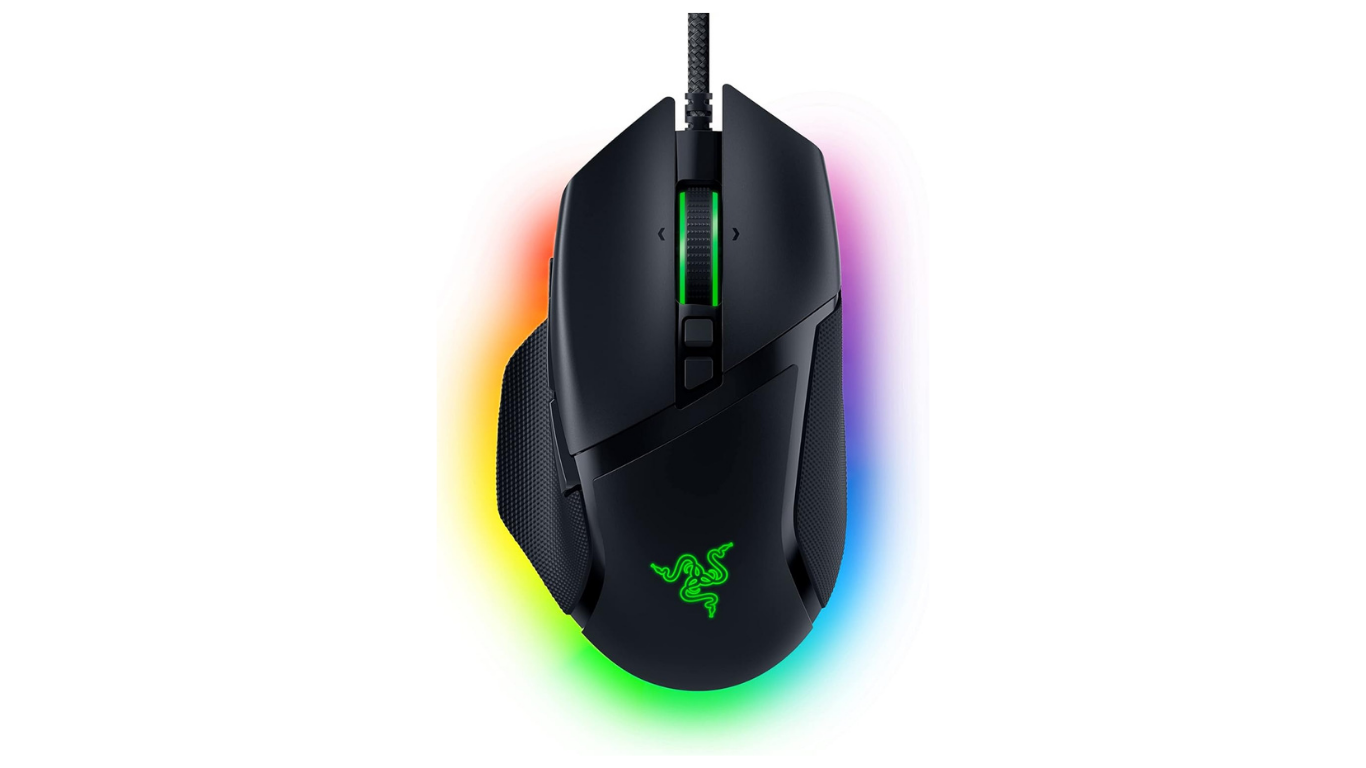
Razer is a global brand that designs premium gaming hardware for gamers, they are famous for their “For Gamers, By Gamers” motto. Razer designs gaming software and gaming laptops, keyboard, headset, mouse. The Razer Basilisk V3 is a popular wired gaming mouse that provides excellent comfort, premium features and High performance tracking during gaming.
In this blog post we will review Razer Basilisk V3 gaming mouse, including its design & build quality, gaming performance, Pros & Cons, buttons customization and many more
Razer Basilisk V3: Key Specifications
| Feature | Specification |
|---|---|
| Sensor | Razer Focus+ Optical Sensor |
| DPI | Up to 26,000 DPI |
| Buttons | 11 Programmable Buttons |
| Scroll Wheel | HyperScroll Tilt Wheel |
| Switches | 2nd Gen Optical Switches |
| RGB | 11 Chroma RGB Zones |
| Weight | 101g |
| Cable | Razer Speedflex Cable |
| Onboard Profiles | 5 |
| Feet | 100% PTFE |
| Polling Rate | 1000Hz |
Design & Build Quality
Ergonomic Shape
- This mouse is specifically designed for right-handed users. It has thumb rest includes in design that is suitable for palm and claw grips
- This has 11 programmable buttons, in which include a left side paddle and a 4-way hyper scroll tilt wheel.
- Its cable is flexible paracord style and feet of mouse are smooth that helps in providing drag-free gliding.
Build Quality
- The top shell of the mouse is made with smooth and grippy matte plastic and the sides are textured with rubberized grips.
- The switches are rated for 70-90 Million clicks and designed to provide prevention from accidental clicks.
- The weight is around 101 grams, that is slightly higher then other Esports mouse.
RGB Lighting
This mouse has 11 RGB Lighting zones, which are customizable by Using Razer Synapse Software, You can customize it with 16.8 million colors, create advanced effects and also sync lights.
Comfort and Grip
Ergonomics and Comfort
- This mouse is shaped specifically for the right-handed users that has thumb rest pad on the left side that naturally supports your thumb during long time use.
- On the left and right click buttons there are slight bumps that are made to provide natural resting position.
Grip Style Compatibility
- Palm Grip: This is the most comfortable and natural grip of this mouse, its shape helps palm in complete covering and allows hand to remain relaxed.
- Fingertip Grip: This is not ideal for the fingertip grip because of its large size and weight, users with smaller hands faces difficulty in fingertip grip.
Sensor Performance
Razer Focus+ Sensor
- It has 26000 DPI
- It has tracking speed of 650 IPS (Inches per second)
- It has 50G max acceleration
- 99.6% precision ensuring pixel accuracy without any smoothing, filtering or acceleration.
- It has advanced features that supports customize lift-off and landing distance with 26 granular levels of height adjustment.
Gaming Performance
FPS Games
- The Focus+ 26K sensor provides perfect tracking in sniper aiming and in micro adjustments
- A dedicated thumb button, by which you can instantly lower DPI that stabilize long range shots.
- It provides zero lag in direct gunfights and in high speed movement.
MOBA Games
- This allows you to map all 11 programmable buttons as your own including item actives and camera hotkeys, directly to your mouse hand.
- Its scroll wheels tilts left and right, that provides two additional micro inputs, you can use them for panning the map and for checking your score.
- The thumb rest on this mouse prevents from hand fatigue during long hours and extended gaming sessions.
Hyper Scroll Tilt Wheel
In the Razer Basilisk gaming mouse features Hyper Scroll Tilt wheel that supports following modes:
- Tactile Cycling Mode: It provides clear and notched steps for precise weapon and skill selection
- Free-Spin Mode: This allows wheel to spin smoothly and quickly, that makes easier to glide through long pages.
- Smart Reel Mode: It automatically shifts from tactile to free spin mode when scroll faster.
- 4-Way Tilting: You can click it left and right for horizontal navigation.
Buttons and Customization
This mouse has 11 programmable buttons:
- Primary Clicks:- Two main buttons for left and right clicks.
- Hyper Scroll Tilt Wheel:- This supports different modes like tactile cycling mode, free spin mode, and smart reel mode, also it features left and right tilting.
- Scroll Mode Button:- This is located below scroll wheel that is used for manually toggle scroll behavior and switching.
- DPI Cycle Button:- This is locate just behind the scroll mode button, that is used to adjust the sensitivity level.
- Side Buttons:- On the left side two thumb buttons for Back and Forward.
- Multi-Function Trigger:- This is located near the thumb rest, that is designed for quick actions like push-to-talk or DPI shifting.
- Profile Switch Button:- This is located on the bottom side of the mouse that is used for switch between onboard hardware profiles.
RGB Customization
- Quick Effects:- From Razer Synapse, you can navigate the mouse and select the lighting tab, from there you can choose presets like Breathing, Spectrum Cycling and Static.
- Chroma Studio:- You can customize individual LED zones (such as scroll wheel, logo) by switching to Advanced Effects in Synapse.
- Chroma-Integrated Games:- With over 150 supported games, you can enable dynamically synced ambient in-game light reactions.
Pros and Cons
Pros
- Its has ergonomics design that includes thumb rest and textured side grips for comfort especially designed for right handed users.
- Hyper Scroll Tilt wheel increases work productivity.
- Highly Customizable due to 11 programmable buttons.
- Its has premium RGB lighting.
- Smooth PTFE mouse feet for smooth gliding and flexible cable.
- Value for money.
Cons
- Its weight is around 101 gram, which is slightly higher than other gaming mouse.
- The base V3 model has only wired connectivity variant, wireless connectivity variant is not available.
- Software required for Heavy Customization.
- Small Hand users may find it large due to its shape.
Razer Basilisk V3 vs Logitech G502 X
| Feature | Razer Basilisk V3 | Logitech G502 X |
|---|---|---|
| Sensor | Focus+ 26K | HERO 25K |
| Weight | 101g | 89g |
| RGB | 11 Zones | Limited RGB |
| Buttons | 11 | 13 |
| Scroll Wheel | HyperScroll Tilt | Dual-mode |
| Switches | Optical | Hybrid Optical-Mechanical |
| Best For | RGB & Customization + Gaming | Competitive Gaming |
Razer Basilisk V3 vs Corsair M65 RGB Ultra
| Feature | Razer Basilisk V3 | Corsair M65 RGB Ultra |
|---|---|---|
| Weight | 101g | B/W 97g to 115g |
| Sensor | 26000 DPI | 26000 DPI |
| Software | Razer Synapse | Corsair iCUE |
| RGB | 11-Zone Chroma RGB | 2-zone RGB backlighting |
| Buttons | 11 Programmable Buttons | 8 Programmable Buttons |
Who Should Buy the Razer Basilisk V3?
- User who wants ergonomic design with a built-in thumb rest that prevents from wrist and hand strain.
- Users who are MMO players, like FPS games and RPG games.
- Users who play games and also works for content creation, streaming and wants to increase their productivity.
- Budget Conscious users.
Who Should Skip It?
- Users who likes Ultra-Lightweight mouse.
- Left Handed Users.
- Users who prefer wireless mouse
Frequently Asked Questions (FAQs)
Is the Razer Basilisk V3 good for FPS games?
Yes, the Razer Basilisk V3 is good for FPS games.
Is the RGB customizable?
Yes, it is fully customizable that has 11 different chroma RGB lighting zones with 16.8 millions colors.
Can I use it without Synapse?
Yes you can use this mouse without Synapse software.
Does it support Mac?
Yes it works with Mac as a basic plug-and-play USB mouse.
Is Basilisk V3 is good for productivity?
Yes it boost productivity in everyday tasks.
Final Verdict
The Razer Basilisk V3 is an affordable mouse that provides excellent comfort, customizable controls, RGB lighting with customization, and excellent tracking. These all features makes it best gaming mouse on this price.
You should definitely consider this mouse if you are looking for a Gaming Mouse.