
Introduction
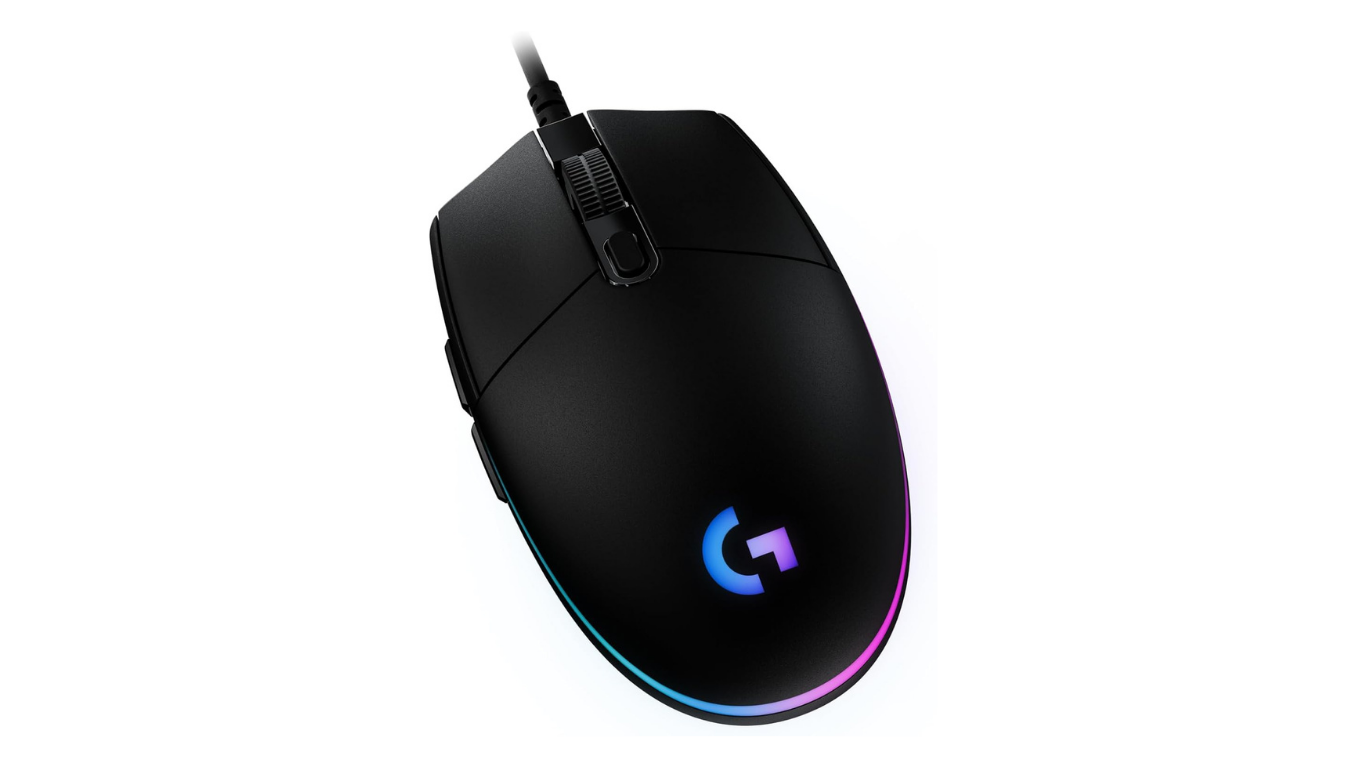
If you are looking for a mouse that is best for gaming, then you will found various mouse models in the market which are mainly focuses on gaming, each mouse has their own different features and price. One of them is Logitech G203 Mouse, this is affordable gaming mouse. This mouse can be used for all types of gaming whether casual or competitive gaming, it delivers excellent performance, You can also use this mouse for everyday office work.
Logitech G203 Specifications
| Feature | Details |
|---|---|
| Sensor | Logitech Gaming Sensor |
| DPI | 200–8,000 DPI |
| Weight | 85g |
| Connectivity | Wired USB |
| RGB | LIGHTSYNC RGB |
| Buttons | 6 Programmable Buttons |
| Polling Rate | Up to 1000Hz |
| Cable Length | 2.1m |
| Software | Logitech G HUB |
| Compatible OS | Windows & macOS |
| Warranty | 2 Years (varies by region) |
Design & Build Quality
Minimal Yet Stylish Design
- The top design has Matt finish, and on the sides slightly texture is added that helps in grip.
- Its shape is symmetrical, that makes it more stable when held tightly, which is a plus point for gaming performance.
- It has 6 programmable buttons, including side buttons, and DPI button at center.
- In its “LightSync” variant RGB light is available that enhance the feel of gaming in dark. This is customizable light that has million of colors.
Comfort and Ergonomics
- Fingertip Grip: This mouse is highly rated for its fingertip grip. It has 11.6 cm length that helps in wrist and finger adjustment. That makes it good option for fast-speed tracking in FPS games.
- Claw Grip: This is best for small- medium hands. Large hands may experience cramps and fatigue, due to lack for supportive hump
- Palm Grip: This mouse is not for the palm grip user, it creates unusual and pitched posture in the hand
Weight
The Logitech G203 Mouse weighs around 85 gram. When includes the cable weight its weighs arounds 99 grams.
RGB Lighting (LIGHTSYNC)
This mouse features RGB Lighting, which can be customized as your choice. This light includes wave effects, audio visualizers effect with 16.8 million colors. You can also access the full features of light by using the Logitech G HUB software in your PC.
Effect:
- Color wave
- Breathing
- Static
- Screen Sampling
- Audio Visualizer
Performance Review
Sensor Performance
The Logitech G203 Mouse features 8000 DPI gaming grade optical sensor, that delivers excellent tracking with zero smoothing, acceleration. This has 1 ms response time with a 1000 Hz polling rate, that all features makes this mouse suitable for competitive gaming, and for the everyday productivity tasks.
Gaming Performance
- Its sensor is incredibly consistent that helps in smooth tracking during fast swipes and in small adjustments in FPS games.
- Its wired connected provides lag-free and uninterrupted connection during gaming, that is essential for competitive gaming.
- Its programmable buttons helps in improving performance during gaming.
DPI & Sensitivity
| Usage | Recommended DPI |
|---|---|
| Office | 800 |
| FPS | 400–800 |
| MOBA | 1200 |
| Casual Gaming | 1600 |
| Productivity | 1000 |
Buttons & Customization
The Logitech G203 Mouse features 6 buttons, which includes Left/Right click buttons, a scrolling wheel, two left side buttons and a DPI adjustment buttons. By Using the Logitech G HUB software, you can programme every buttons, by which you can create a custom macros, adjust the DPI and can be customize RGB Lighting easily.
Button Customization
All the buttons are programmable in G203 mouse by using G HUB software.
- Keybinds: You can set keyboards key or key combination( eg:- Ctrl+C, Ctrl+V) to any button of the mouse.
Macros: - System Controls: You can adjust volume up and down, Mute, and Media controls Play and Pause from mouse by customization.
- G-Shift: You can set the modifier button to acts like ‘Shift’ that means when you held it unlock all the secondary sets of function for all the other buttons of mouse.
- DPI Switching: You can set the DPI in this mouse from 1 to 5 levels ( 200 to 8000 DPI) and can also assign a dedicated button of “DPI shift” for especially sniper gaming
Logitech G203 Mouse Pros and Cons
Pros
- It's price is affordable and provides value for money
- It's sensor performance is very consistent that provides 100% accuracy during fast movement
- This Mouse has classic symmetrical shape that is easy to grip for most of the users.
- It's Customizable RGB lighting SYNC with screen and media.
- All the 6 buttons are fully programmable with using Logitech G Hub software.
Cons
- In this mouse traditional rubber cable is used rather than flexible cable that can creates difficultly in drag on desk.
- It's shape is symmetrical, due to which it may create discomfort during long time use.
- There is no special grip on it's sides
- Buttons are limited
Who Should Buy Logitech G203?
Ideal For:
- Beginners in PC Gaming
- RGB Lighting enthusiasts
- Competitive Gaming users
- FPS players
- Students
- Office Users with light work
Not Ideal For:
- Pro Gamers
- MMO Gamers
- Wireless Mouse Enthusiasts
- Users with Large Hands
- Users who wants more programmable buttons
Frequently Asked Questions
Is Logitech G203 good for gaming?
Yes, this is a good budget gaming mouse.
Can I use Logitech G203 on Mac?
Yes, you can use this mouse in Mac, it is fully compatible with MacOS
Is Logitech G203 lightweight?
This is a lightweight gaming mouse.
What is the DPI of Logitech G203?
Logitech G203 mouse DPI range is from 200 to 8000
Final Verdict
If you are looking for a mouse that is budget-friendly, great for gaming and can also be used in everyday tasks, then this mouse will be a good option for you. Try Logitech G203 Mouse……